2 + 2R Basics
1 R and Positron
1.1 What is R?
R is a programming language designed for:
- statistical analysis
- data visualization
- reproducible research
- data science workflows
1.2 What is Positron?
Positron is a modern development environment created by Posit for working with R and Python.
Compared to traditional RStudio, Positron offers:
- a cleaner interface
- modern editor features
- AI-assisted coding tools
- multi-language support
- improved performance
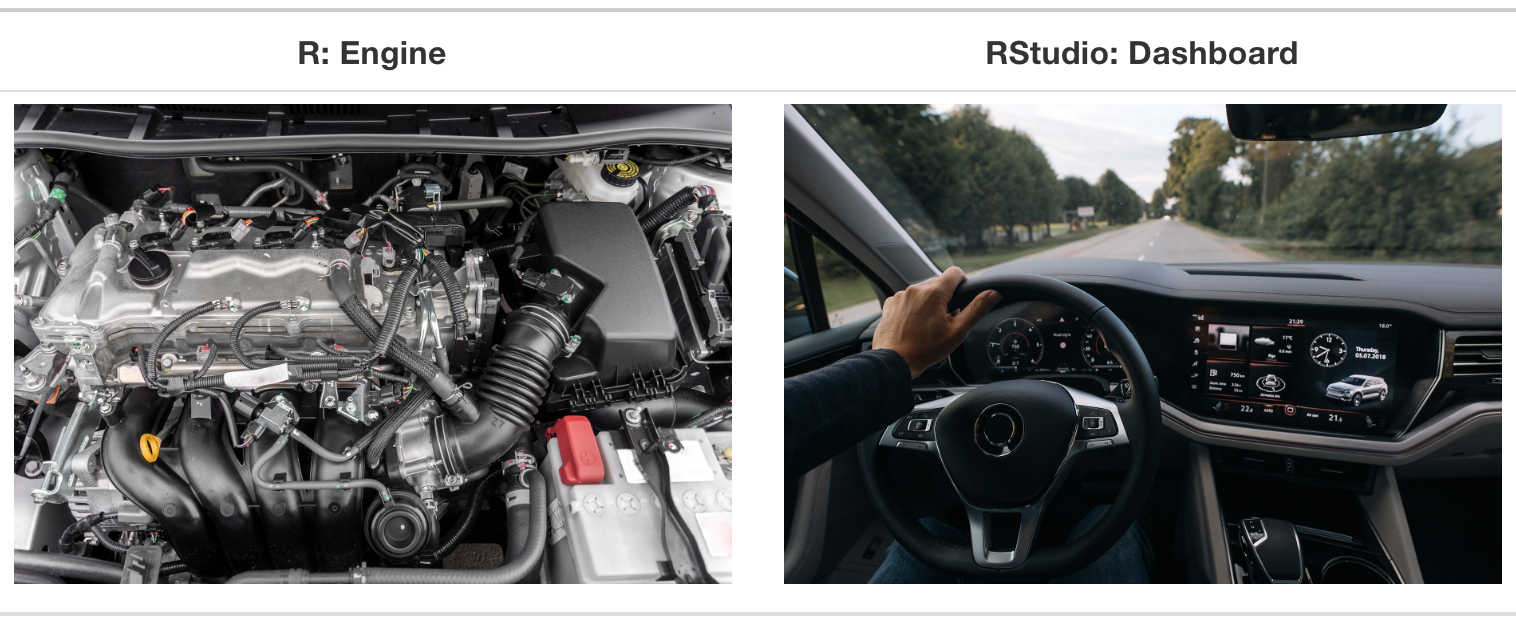
R is the language. Positron/RStudio is the workspace where you write and run code.
Tip
See this tutorial on Installing R and Positron if you need help prior to the first day of R-LAB.
2 Components of an IDE
| Component | Description |
|---|---|
| Console | Run R commands and view errors |
| Source | Write and save scripts |
| Environment | View objects and datasets |
| Output | Display plots and tables |
| Files | Manage project files |
| Packages | Install and load packages |
| Help | Access documentation |
| Terminal | Run system commands |
2.1 IDE Layout

3 Console vs Script Files
3.1 Console
The Console runs commands immediately.
Use it for:
- quick calculations
- testing code
- exploring objects
Example:
3.2 Script Files
Scripts let you save and organize code.
Benefits include:
- reproducibility
- easier debugging
- collaboration
- cleaner workflows
Most analyses should be written in scripts instead of directly in the Console.
my_number <- 2 + 24 Running Code
Common shortcuts:
| Action | Windows | Mac |
|---|---|---|
| Run line/code | Ctrl + Enter | Cmd + Enter |
| Save file | Ctrl + S | Cmd + S |
| Find | Ctrl + F | Cmd + F |
You can run:
- one line
- selected code
- entire scripts
5 Projects and Directories
5.1 Why Use Projects?
Projects help:
- keep files organized
- separate analyses
- improve reproducibility
- simplify collaboration
5.2 What is a Working Directory?
The working directory is the default folder where R reads and saves files.

When you open a project, the working directory is automatically set to that project folder.
6 Creating Objects
R stores information in objects using the assignment operator <-.
age <- 25
study_group <- "control"
height_inches <- 686.1 Naming Tips
Good variable names are:
- descriptive
- lowercase
- consistent
Recommended style:
blood_pressure
participant_age
study_groupAvoid vague names like:
x
data1
thing7 Packages and Functions
7.1 What is a Package?
A package is a collection of functions, datasets, and tools designed for a specific purpose.
7.2 What is a Function?
Functions:
- take input
- perform an action
- return output
A package is like a toolbox. A function is a single tool inside the toolbox.
8 tidyverse Packages
| Package | Purpose | Example Functions |
|---|---|---|
| dplyr | Data wrangling | filter(), mutate() |
| tidyr | Data organization | pivot_longer() |
| ggplot2 | Visualization | geom_point() |
| readr | Importing data | read_csv() |
9 Installing vs Loading
Installing only happens once:
install.packages("ggplot2")Loading happens every session:
library(ggplot2)10 Using Functions in R
Functions require inputs called arguments.
Use:
help(mean)or:
?meanto access documentation.

11 Error Messages
Errors are a normal part of programming.
Common causes include:
- misspelled object names
- missing parentheses
- missing packages
- incorrect data types
Learning to read error messages carefully is an essential R skill.
Example:
mean(c(1, 2, "3"))12 Updating Packages
12.1 Why Update?
Updating software helps:
- fix bugs
- improve performance
- add new features
- improve package compatibility
12.2 Update Packages
update.packages(ask = FALSE)Install an individual package:
install.packages("package_name")13 Atomic Data Types
13.1 Common Data Types
| Type | Example | Typical Use |
|---|---|---|
| double | 34.2 |
BMI, blood pressure |
| integer | 15L |
IDs, counts |
| character | "placebo" |
Labels, groups |
| logical | TRUE |
Conditions |
Integers and doubles are both numeric types.
# Double
bmi <- 24.8
class(bmi)
# Integer
id <- 3L
class(id)
# Character
treatment_arm <- "placebo"
class(treatment_arm)
# Logical
has_hypertension <- FALSE
class(has_hypertension)14 Why Data Types Matter
Functions behave differently depending on data type.
num1 <- 5
num1 + 2
num2 <- "5"
num2 + 215 Vectors
Vectors store multiple values of the same type.
v1 <- c(1:5)
v2 <- c("cat", "house", "bunny")
v3 <- c(v1, v2)
v316 Factors
Factors are used for categorical variables.
bloodtype_factor <- factor(c("A", "B", "AB", "O"))
height_factor <- factor(
c("short", "medium", "tall"),
ordered = TRUE,
levels = c("short", "medium", "tall")
)17 Lists
Lists can store mixed data types.
my_list <- list(
name = "Bill",
age = 35,
scores = c(92, 87, 95)
)
my_list18 Data Frames vs Tibbles
18.1 Data Frames
- Base R structure
- Allows partial matching
- May automatically convert types
18.2 Tibbles
- Part of the tidyverse
- Cleaner printing
- Requires exact column names
- Safer behavior
library(tibble)
tb <- tibble(
age = c(25, 30, 45),
average_height = c(55, 62, 50)
)
tb19 GitHub and CRAN
| Source | Purpose | Install Method |
|---|---|---|
| CRAN | Stable releases | install.packages() |
| GitHub | Development versions | devtools::install_github() |
19.1 Install from CRAN
install.packages("ggplot2")19.2 Install from GitHub
install.packages("devtools")
devtools::install_github("bhelsel/RLAB")20 Forking vs Cloning
| Forking | Cloning |
|---|---|
| Copies repo to GitHub account | Copies repo locally |
| Used for contributing | Used for working locally |
Typically you fork first, then clone your fork.
21 Reproducible Research
One major goal of R programming is reproducibility.
A reproducible project allows someone else to:
- run the same code
- obtain the same results
- understand the workflow
Good practices include:
- using projects
- organizing files
- saving scripts
- commenting code
22 What is Quarto?
Quarto combines:
- code
- text
- figures
- results
into a single document.
Quarto can create:
- HTML pages
- PDFs
- presentations
- websites
This document was created using Quarto.
23 Free Learning
Cheat Sheets 


- https://r4ds.hadley.nz/
- https://www.youtube.com/@RProgramming101
- https://www.youtube.com/@EquitableEquations
- https://data-flair.training/blogs/r-tutorials-home/
- https://www.coursera.org/learn/r-programming